Hi again ! In this post I will be showing you a lesson plan in which I included the use of an amazing webpage to create comics : makebeliefscomix
If you don`t know how to use Makebeliefscomix you can find a tutorial here:
Hope you enjoy it ! :DIf you don`t know how to use Makebeliefscomix you can find a tutorial here:
Level: intermediate
Age: 13/14 year-old studets
timetable: 2 hours per week
Warmer: ( 10-minute activity )
The teacher is going to divide the class into different groups. Each group will get different pictures
related to what humans do with our planet. In groups they will have to divide those pictures into the
ones that are contaminating our planet and the ones that are saving our planet. Once they have
categorized the pictures, they will have to come up with epigraphs for each of them explaining how
they contribute to damaging or saving our planet.
related to what humans do with our planet. In groups they will have to divide those pictures into the
ones that are contaminating our planet and the ones that are saving our planet. Once they have
categorized the pictures, they will have to come up with epigraphs for each of them explaining how
they contribute to damaging or saving our planet.
Once each of the groups have finished, we are going to share the results trying to find similarities and
differences.
differences.
Some of the pictures students will get are:


Web: ( 40-minute activity)
Students will be asked to watch the following video:

After doing some comprehension activities related to the video, the teacher will ask the students who
their superhero is and she will ask them to invent an “environmental superhero” and create a short
comic showing an environmental problem ( trash in the river, pollution, deforestation,etc.) and a way
in which this superhero can help change this situation ( recycle, use less plastic, plant, etc). To do
this comic, students are going to learn how to use makebeliefscomix, a great webpage they can use
to create their comic.
Before jumping into the activity, the teacher is going to ask the students to watch a tutorial on how to
use the webpage. Then, she is going to show them the final product of a comic the teacher had created
and with all that support, students are going to do their own comic.
their superhero is and she will ask them to invent an “environmental superhero” and create a short
comic showing an environmental problem ( trash in the river, pollution, deforestation,etc.) and a way
in which this superhero can help change this situation ( recycle, use less plastic, plant, etc). To do
this comic, students are going to learn how to use makebeliefscomix, a great webpage they can use
to create their comic.
Before jumping into the activity, the teacher is going to ask the students to watch a tutorial on how to
use the webpage. Then, she is going to show them the final product of a comic the teacher had created
and with all that support, students are going to do their own comic.
What's next: (10-minute activity)
Students will act out their comics in front of the rest of their classmates. Finally, we are going to vote for the
best superhero !
best superhero !
Frameworks that support the use of MakeBeliefsComix:
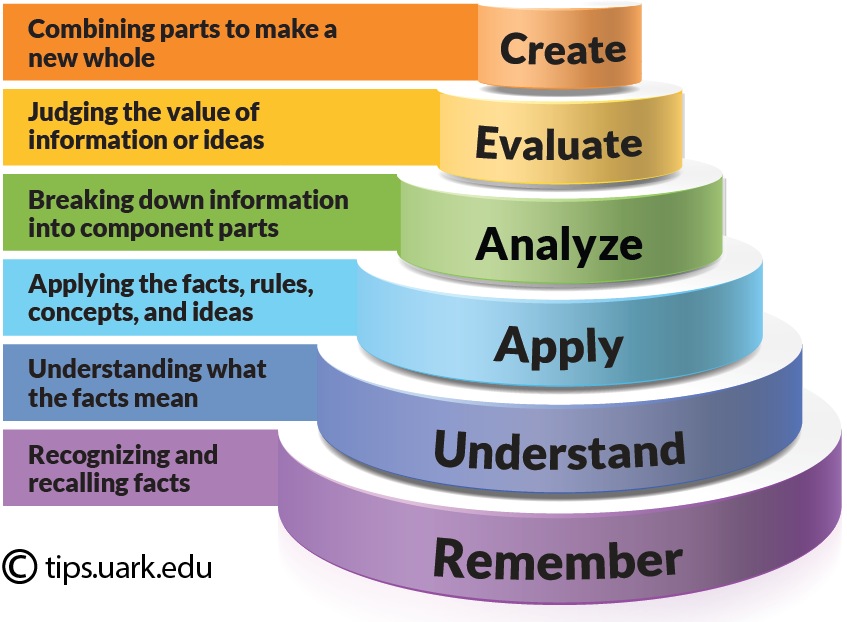
Bloom´s Digital Taxonomy
The main focus of the Bloom´s Digital Taxonomy (2008) is on how different tools can act as vehicles for transforming students thinkig at different levels in a digital environment. This theoretical framework helps teachers plan their lessons going gradually from one level to another one. In this particular case, students are working at the highest level of the Bloom's digital Taxonomy : “creating”. Creating is the final level of the Bloom´s Digital Taxonomy and it is concerned with taking various elements and creating a new, coherent product. In this particular activity, students have to take into account all the information they had learned about pollution and possible ways of solving it and transform that information into a comic in which there is a superhero that helps the world.
TIC TAC TEP.
TIC is an umbrella term that makes reference to the technology that facilitates acquisition, transmission and interchanging processes. It is an integration of the technology and information in education. It does not exclusively belong to the educational field. It is now very well known that the mere use of technology without any meaningful reason into the classroom is not enough to ensure learning.This is why the term TAC appeared. This term makes reference to the use of TECs as a formative tool that has a pedagogical background that supports its use within every teacher´s plan.
Last but not least, nowadays a new term has been proposed ( TEP ) to emphasise this new technologydemocracy in which people can interact and collaborate as creators of new content that is generated by a virtual community.
In this case, students are working at a TAC level. In this activity, learners are actual creators of new material in which they took information from a video that was uploaded in another webpage and now they are transforming it into a comic. Students are using technology with a clear pedagogical purpose which is to summarize the most important information they took from the video and use it to do a new activity. However, the webpage only allows students to print or save the comic in their computers. It doesn´t give students the option of sharing it with a virtual community.
Last but not least, nowadays a new term has been proposed ( TEP ) to emphasise this new technologydemocracy in which people can interact and collaborate as creators of new content that is generated by a virtual community.
In this case, students are working at a TAC level. In this activity, learners are actual creators of new material in which they took information from a video that was uploaded in another webpage and now they are transforming it into a comic. Students are using technology with a clear pedagogical purpose which is to summarize the most important information they took from the video and use it to do a new activity. However, the webpage only allows students to print or save the comic in their computers. It doesn´t give students the option of sharing it with a virtual community.

SAMR MODEL
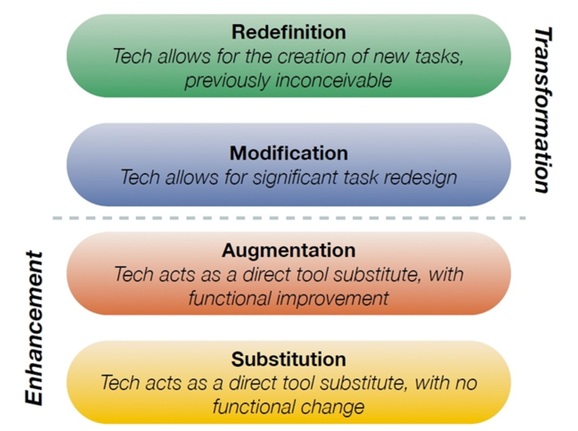
According to the SAMR model by Ruben Puentedura, The integration of technology into the
classroom can be seen as a ladder, in which the first two steps technology can be seen as a mere
enhancement of the activities and the last two steps transform those activities. The first step is
substitution, the second one augmentation, the third one modification and the last one redefinition.
This activity is a clear example of how technology is integrated at an augmentation level. Students could have created the comic without the use of technology but it would have taken much more time and students wouldn't have been able to add all the effects that this tool allows them to add.
References:
Puentedura, R. (2006). Transformation, Technology, and Education. Retrieved in October 2019 fromhttp://www.hippasus.com/rrpweblog/archives/2014/06/29/LearningTechnologySAMRMdel.pdf.
Sneed, O. (2016). Integrating Technology with Bloom's Taxonomy. Retrieved in October 2019, from https://teachonline.asu.edu/2016/05/integrating-technology-blooms-taxonomy/.
(n.d.). Retrieved from https://www.youtube.com/watch?v=HoNQfUWWRMk.
(n.d.). Retrieved from https://www.youtube.com/watch?v=bn8R_XqjjI0.
Create Comics Online: Comix Maker: Comic Strips: Comic Generator. (n.d.). Retrieved from https://www.makebeliefscomix.com/.
(n.d.). Retrieved from https://www.youtube.com/watch?v=bn8R_XqjjI0.
Create Comics Online: Comix Maker: Comic Strips: Comic Generator. (n.d.). Retrieved from https://www.makebeliefscomix.com/.


No hay comentarios.:
Publicar un comentario